
Skip to content
-
Subscribe to our newsletter & never miss our best posts. Subscribe Now!
Just another Geek

Just another geek

Just another Geek

Just another geek

  • Home
  • Shop
    • Shop
    • Cart
    • Checkout
  • About
    • About Me
    • Coding Projects
    • Software Reqs
  • My Collections
    • Other Games
    • NES Games
    • Comics
      • Anime Insider
      • Simpsons
      • Animerica
  • My Extras …
    • My Search
    • My Stream
    • My Videos
  • FlameNet
  • Hitt Hosting
  • Forum
  • Home
  • Shop
    • Shop
    • Cart
    • Checkout
  • About
    • About Me
    • Coding Projects
    • Software Reqs
  • My Collections
    • Other Games
    • NES Games
    • Comics
      • Anime Insider
      • Simpsons
      • Animerica
  • My Extras …
    • My Search
    • My Stream
    • My Videos
  • FlameNet
  • Hitt Hosting
  • Forum
Close

Search

Subscribe
Tech

Creating a Dial Up Connection Using Teltone TLS-5

By
December 26, 2025 1 Min Read
0

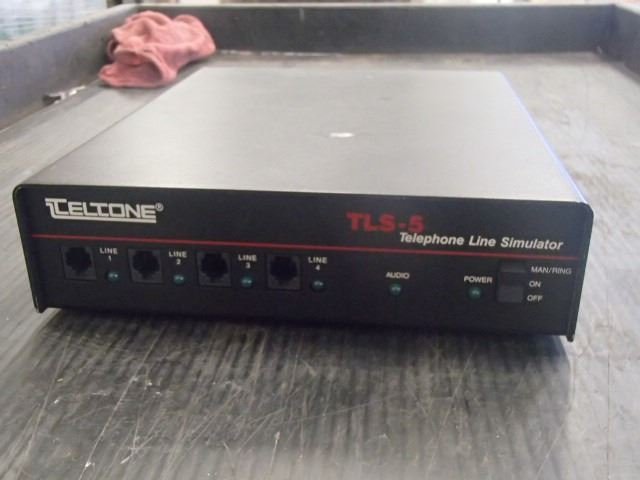
I recently came across a video that used a Teltone TLS-5 telephone simulator that was used as a dial up connection. I found a used one and decided to give it a shot.

Hardware used:

  1. Teltone TLS-5
  2. USROBOTICS USB modem
  3. IBM Thinkpad T42 running Windows 98
  4. Regular telephone for testing

Steps involved.

  1. Connect Teltone TLS-5 to power outlet and switch to On position
  2. Install the USB modem to a Windows XP host (I currently have a 6 node Proxmox cluster with a Windows XP virtual machine that has the USB modem attached) to port 2
  3. Install USB modem drivers on host
  4. Connect the laptop to port 3
  5. Install modem drivers on to laptop host if the host is missing them
  6. On the Windows XP host create a new advanced internet connection and select the modem and user as the dial in user.
  7. On the laptop or host you want to dial in from, create a new dial up connection and use the username/password from step 6 and use number 102 as the phone number
  8. Click Connect and you should be connected.

Gotchas
In the tutorial I was using Netscape Navigator. The homepage was home.netscape.com. This is no longer a thing. An upcoming tutorial will use pihole as a DNS lookup so that going to old URLs still work.


Video demonstration of someone else ring testing:

Author

Follow Me
Other Articles
Previous

Windows 95 Keynote

Next

90s Server Tech Revisited

No Comment! Be the first one.

Leave a Reply Cancel reply

Your email address will not be published. Required fields are marked *

Contact

Please enable JavaScript in your browser to complete this form.
Name *
Loading

Cart

Latest Posts

  • Calculate Radial Kepler Equation using Julia
  • Convert QCow2 Image to a Docker Volume
  • Convert QCow2 image to AWS AMI
  • How to Isolate QEMU Hosts
  • Windows 2000 Hardening Script
Copyright 2026 — Just another Geek. All rights reserved. Blogsy WordPress Theme